
A dark driveway or backyard feels a lot less safe than one that lights up the moment someone steps onto your property. If you already have outdoor flood lights installed, you don’t need to replace the entire fixture to get motion-activated security. Converting a standard flood light into a motion sensor system is one of the smartest upgrades you can make for safety, energy savings, and convenience.
Below, you’ll learn five practical ways to turn your flood light into a motion-sensing fixture. Each method is ranked from easiest to most advanced, so you can pick the option that matches your budget, skill level, and security goals.
Swap in a PIR Motion Sensor Bulb

The fastest no-tools solution is replacing your existing bulb with a motion-sensing LED bulb. These all-in-one units contain a built-in Passive Infrared (PIR) sensor that detects body heat from people and animals.
How PIR Bulbs Detect Movement
A small sensor nub at the top of the bulb reads infrared energy emitted by warm bodies. When motion enters its detection zone, typically 5 to 10 feet, the bulb switches on automatically. After no movement is sensed for 10 to 30 seconds, it shuts off to conserve power.
Installation takes seconds. Screw the bulb into any standard E27 socket, leave the wall switch in the “on” position, and the sensor handles the rest.
Top PIR Bulb Picks
- QPAU E27 7W LED Motion Sensor Bulb – Compact design with a 120° detection angle, ideal for covered porches.
- iRainy E27 Infrared Motion Detection Bulb – Adjustable sensitivity and a 30-second on-time after motion.
- Sky Genius Motion Sensor LED Bulb – High brightness output and durable casing that performs well in cold temperatures.
Pro Tip: PIR bulbs work best inside enclosed fixtures. A covered housing shields the sensor from rain and direct sunlight, both of which can cause false triggers.
Know the Limitations
- Short detection range makes them unsuitable for long driveways.
- Most models have fixed timing and sensitivity settings.
- They are not weatherproof unless installed under a protective cover.
For quick upgrades in sheltered areas like porches, garages, or entryways, PIR bulbs are the simplest path to motion-activated light.
Install a Screw-In Socket Adapter

If you want to keep your current high-lumen flood bulb, a socket adapter adds motion control without changing the bulb itself. The adapter screws into the fixture first, then your bulb screws into the adapter, acting as a smart switch between power and light.
How Socket Adapters Work
The adapter breaks the circuit until motion is detected. Once triggered, it completes the connection and powers the bulb. Most adapters use PIR sensors with a 120° field of view, giving you wider coverage than a typical sensor bulb.
Choose Outdoor-Rated Models Carefully
Not every adapter is built for the elements. Two popular options illustrate the difference:
- Defiant Indoor 120° Motion Sensing Socket – Marketed as an anti-theft device but officially rated for indoor use. Some homeowners install it outdoors, but long-term reliability in wet conditions is uncertain.
- LUXON Motion Sensor Light Socket Adapter – Explicitly certified for both indoor and outdoor use, making it the safer pick for exposed flood light fixtures.
Warning: Installing an indoor-rated adapter outdoors may void the warranty and create electrical hazards in wet weather.
Setup in Under Five Minutes
- Turn off power at the switch.
- Unscrew the existing bulb.
- Screw in the motion sensor adapter.
- Screw your original bulb into the adapter.
- Flip the switch back on and test the detection zone.
No wiring, no tools, just motion-activated lighting in minutes.
Add a Security Camera Adapter
For homeowners who want lighting and surveillance in one device, a camera adapter turns your flood light fixture into a smart security node. These devices screw into the socket and power a built-in camera along with motion-activated lighting.
Toucan Security System Overview
The Toucan adapter is a strong example of this hybrid approach. It screws into your flood light socket and delivers both illumination and active monitoring.
Key features include:
- Motion-triggered flood light for instant illumination
- 1080p HD live video feed viewable from your phone
- Two-way intercom so you can speak to visitors remotely
- 100 dBA siren to scare off intruders
- IP44 weather rating for protection against splashing water
- Mobile alerts sent the instant motion is detected
- 2 hours of free cloud storage for recorded clips
Installation takes about 15 minutes and requires only a screwdriver. The light switch must stay in the “on” position so the device always has power.
Why This Method Works for Security
This approach turns a passive light into an active defense system. You don’t just startle intruders with sudden brightness. You also see them, hear them, and record evidence. The combination of light and a loud siren often causes trespassers to flee before attempting entry.
Best for high-risk access points like driveways, side gates, and back patios.
Hardwire a Central Motion Sensor

For properties needing whole-house illumination from a single trigger, hardwiring a central motion sensor offers the most powerful coverage. One sensor can control multiple flood lights simultaneously, which is ideal for large yards or homes with several outdoor fixtures.
Single Sensor, Multiple Lights
Install a motion sensor on the first fixture in the circuit. Wire the remaining lights to the load side of that sensor so they all activate together when motion is detected.
Requirements include:
- A sensor rated for the total wattage of all connected lights
- Basic electrical knowledge
- A voltage tester and wire connectors
Avoid Blind Spots
A single sensor only covers the area it faces. If it points at the front driveway, the side yards and backyard remain unmonitored.
Solutions include:
- Using a wide-angle sensor with up to 270° coverage when layout allows
- Installing multiple sensors on different sides, wired to a central relay
- Positioning sensors to cover key entry zones like the garage, back door, and side gates
Expert Tip: Mount sensors 6 to 8 feet high and angle them slightly downward for the most reliable detection.
Set the Right Time Delay
Make sure the sensor keeps lights on long enough to be useful. Most models offer a 30-second to 5-minute delay. Some include built-in timers, while others require an external timer module.
Best for homeowners comfortable with electrical work who want synchronized lighting across the entire property.
Integrate With a Smart Home System
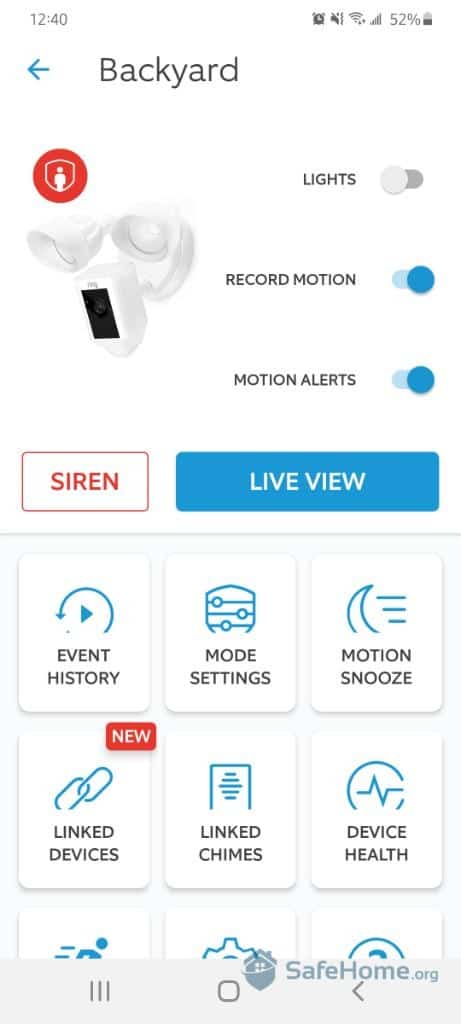
For full automation, remote access, and voice control, connecting your flood lights to a smart home ecosystem delivers the most flexibility. This method uses wireless sensors and smart switches instead of physical rewiring.
Ring Motion-Activated Setup
Ring offers a simple, scalable solution for beginners.
Components needed:
- Ring Battery-Powered Motion Sensor (around $25)
- Ring Bridge or Ring Floodlight Cam (around $90 and up)
- Your existing outdoor light or a compatible smart switch
Setup steps:
- Place the sensor near a door or walkway.
- Link it to your Ring-compatible light through the app.
- When motion is detected, the light turns on automatically.
- You receive a phone alert and can view the live camera feed if equipped.
No rewiring is required, just setup and pairing.
Samsung SmartThings and Z-Wave Automation
Advanced users can build a fully customizable network using SmartThings and Z-Wave devices.
System components:
- Hub: Samsung SmartThings Hub (3rd Generation)
- Switch: Z-Wave compatible wall switch (requires a neutral wire)
- Sensor: Outdoor-rated Z-Wave motion sensor
- Voice Control: Works with Alexa and Google Assistant
Automation examples include:
- “Turn on flood lights at dusk when motion is detected, off at midnight.”
- “If the front door sensor opens after 10 PM, trigger all outdoor lights.”
- “Enable Vacation Mode to randomize light activation and simulate occupancy.”
Must-Have: A neutral wire in your switch box. Most smart switches won’t function without one.
Benefits Over Traditional Methods
- Remote control from anywhere using your phone
- Custom schedules and triggers
- Integration with alarms, thermostats, and smart locks
- No structural wiring changes
Best for tech-savvy homeowners who want a unified, intelligent security network.
Compare All Conversion Methods

| Feature | PIR Bulb | Socket Adapter | Camera Adapter | Hardwired Sensor | Smart Home System |
|---|---|---|---|---|---|
| Installation Difficulty | Low | Low | Low to Medium | High | Medium |
| Wiring Required | No | No | No | Yes | Minimal |
| Coverage Scope | One fixture | One fixture | One fixture | Whole house | Whole house |
| Smart Features | None | None | App, video, siren | None | App, voice, automation |
| Outdoor Rated | Varies | Check model | IP44 (Toucan) | Yes | Yes |
| Estimated Cost | $10 to $20 | $15 to $25 | Around $199 | $50 to $100 plus labor | $150 and up |
| Best For | Quick fix, sheltered areas | Keeping existing bulb | Security plus lighting | Synced whole-house lighting | Full home automation |
Maximize Security and Efficiency
Reduce Energy Waste
A 150-watt flood light left on for 8 hours every night costs about $52 per year. Motion activation cuts runtime to minutes per day, slashing energy use by 90% or more. You also reduce light pollution, helping preserve night sky visibility in your neighborhood.
Prevent False Triggers
Common issues include pets activating the sensor, tree branches swaying in the wind, and headlights from passing cars.
Fixes include:
- Adjusting the sensor angle downward
- Choosing models with pet immunity that ignore animals under 40 pounds
- Installing shielding hoods to narrow the detection zone
Extend Device Lifespan
Outdoor electronics degrade faster due to moisture and UV exposure.
Protection tips:
- Choose devices rated IP44 or higher
- Install under eaves or use weather covers
- Clean sensor lenses every 3 to 6 months
Frequently Asked Questions About Motion Sensor Flood Lights
Do motion sensor bulbs work in cold weather?
Most PIR motion sensor bulbs perform well in cold temperatures, though extreme cold can slightly reduce battery efficiency in wireless models. Bulbs like the Sky Genius are designed to handle low temperatures reliably.
Can I use a motion sensor bulb in an existing flood light fixture?
Yes, as long as the fixture uses a standard E27 socket and the bulb is installed in a covered or sheltered location. Direct exposure to rain can damage the sensor and cause malfunctions.
How do I stop my motion sensor light from triggering all night?
Adjust the sensor angle downward to avoid detecting distant movement like cars or pedestrians. You can also add a shielding hood or switch to a model with pet immunity and adjustable sensitivity.
Is a neutral wire required for smart flood light switches?
Most Z-Wave and Wi-Fi smart switches require a neutral wire in the switch box to operate. If your home lacks a neutral wire, consider battery-powered sensors paired with a smart bulb or plug-in module instead.
What is the best outdoor-rated motion sensor adapter?
The LUXON Motion Sensor Light Socket Adapter is explicitly certified for both indoor and outdoor use, making it the safest choice for exposed flood light fixtures.
How much can I save by switching to motion-activated lighting?
A 150-watt flood light running 8 hours per night costs about $52 per year. Motion activation reduces usage to minutes per day, often cutting energy costs by 90% or more.
Final Thoughts on Turning Your Flood Light Into a Motion Sensor
Converting a standard flood light into a motion-activated fixture is one of the highest-impact upgrades you can make for home security and energy efficiency. For beginners, a LUXON outdoor-rated socket adapter delivers reliable results in minutes. For security-focused homeowners, the Toucan camera adapter adds video, two-way audio, and a siren in a single device. If you want synchronized lighting across your entire property, hardwiring a central sensor or building a SmartThings or Ring ecosystem offers the most control.
Start simple with a screw-in adapter, then scale up as your needs grow. The result is a smarter, safer, more efficient home that lights up only when it matters.