

You step outside to grab the mail, and your flood light clicks off after 30 seconds, plunging your driveway into darkness. Or maybe it triggers every time a neighbor’s cat walks by, turning your backyard into a strobe light at 2 a.m. These frustrations are exactly why so many homeowners search for how to remove motion sensor from flood light functionality. You want reliable lighting that stays on when you need it.
The good news is that you have several safe options, ranging from a quick switch trick to full fixture replacement. This guide walks you through manual override modes, sensor blocking, rewiring techniques, and replacement steps. You will also learn which methods to avoid, like tampering with internal circuit boards, and when to call a licensed electrician.
Activate the Built-in Manual Override Mode
Most modern motion sensor flood lights include a manufacturer-programmed override that disables motion detection temporarily. You can activate this with nothing more than your existing wall switch.
Toggle the Wall Switch to Force Always-On Mode
This sequence works on common models, including Home Zone Security fixtures:
- Turn the wall switch ON and wait about 15 seconds for the light to complete its warm-up cycle and shut off automatically.
- Within 3 seconds, flip the switch in this rapid sequence: OFF → ON → OFF → ON.
- The light will turn on and stay illuminated continuously, ignoring motion.
This “always-on” mode typically lasts up to 6 hours or until dawn, depending on your model. After that, the fixture reverts to standard motion-sensing operation.
Pro Tip: If the override fails, perform a hard reset. Turn the switch OFF for 10 seconds, then back ON. Wait 15 seconds and retry the toggle sequence.
Reset Back to Motion-Sensing Mode
To return to automatic detection, turn the wall switch OFF for at least 10 seconds, then back ON. The light will resume normal motion-triggered behavior.
Troubleshoot Common Override Problems
- Light does not respond to the toggle? LED bulbs are required for reliable override function. Incandescent or CFL bulbs cause timing delays due to slower startup.
- Light flickers after override? This often points to a failing bulb or an incompatible dimmer switch. Swap in a standard non-dimmable LED.
- Override only lasts a few minutes? The unit may be nearing end-of-life or experiencing a firmware glitch. Consider replacement if the issue persists.
Block the Sensor Lens for a Quick Temporary Fix
If your fixture lacks an override function, or you need a fast reversible solution, covering the sensor lens stops motion detection without any rewiring.
Cover the PIR Sensor with Electrical Tape
Locate the Passive Infrared (PIR) sensor, usually a small translucent dome or rectangular window on the front or underside of the fixture.
- Turn off power at the wall switch.
- Cover the sensor completely with opaque black electrical tape.
- Restore power at the switch.
With the sensor blocked, it cannot detect heat signatures. Depending on your model, this either keeps the light off entirely (requiring manual switch control) or forces it to stay on when powered.
⚠️ Note: Results vary by brand. Test this method before relying on it long-term.
Weigh the Pros and Limitations
- ✅ Fast and non-destructive
- ✅ Fully reversible by removing the tape
- ❌ Not a permanent solution
- ❌ Affects the fixture’s appearance
- ❌ May not work on all models
Use this approach for short-term testing or seasonal needs, like outdoor gatherings, before committing to a more permanent fix.
Rewire the Fixture to Bypass the Sensor Permanently
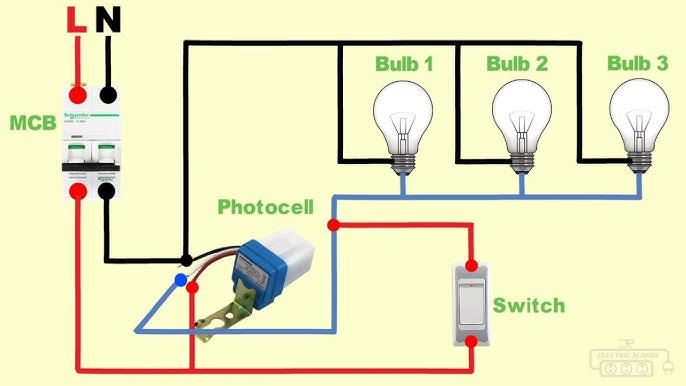
For a permanent solution, you can rewire the fixture to bypass the internal motion control circuit. This converts your flood light into a standard switch-controlled fixture.
🔌 Critical Safety Step: Turn off power at the circuit breaker, not just the wall switch. Use a non-contact voltage tester to confirm wires are dead before touching anything.
Identify Each Wire’s Function
With the fixture removed from the mounting bracket, you will see:
- Black (Hot) – Incoming power from the switch
- White (Neutral) – Return path
- Green or Bare (Ground) – Safety ground
- Internal Wires – A separate black wire leading from the motion sensor module to the light board
Disconnect the Sensor and Connect Direct Power
- Locate the sensor’s output wire, often labeled PMO (Motion Output) or connected via a small plug.
- Disconnect it from the LED driver board.
- Cap the sensor’s hot input wire with a wire nut to isolate it.
- Connect the house black (hot) wire directly to the LED+ or light input terminal.
- Connect white to white and ground to ground.
Now the light receives power directly from the switch, with no motion logic involved.
✅ Result: The light turns on when the switch is ON and off when the switch is OFF, just like a regular fixture.
Know When Rewiring Is Not an Option
Many modern LED flood lights, like the Home Zone MK-SC0108, have integrated circuit boards where the sensor, driver, and LEDs are all on one unit. In these cases:
- There is no separate sensor wiring
- Attempting to jump pins or modify the PCB can destroy the unit or create a fire hazard
If your model is integrated, skip rewiring and move directly to full fixture replacement.
Add a Toggle or SPDT Switch for Maximum Flexibility

Want the best of both worlds? Install a switch that lets you choose between motion sensing and constant light on demand.
Wire a Parallel Override Switch
A second switch wired in parallel with the motion sensor’s output gives you manual control anytime:
- When this switch is ON, it sends power directly to the light, overriding the sensor.
- When OFF, the motion sensor regains control.
Install a 3-Way SPDT Switch for Three Modes
A Single-Pole Double-Throw (SPDT) switch offers three distinct positions:
- ON – Light stays on constantly
- OFF – Light is off completely
- AUTO – Motion sensor is active
Wiring this requires running an extra control wire and mounting a multi-position switch. If you are unsure about the wiring, hire a licensed electrician.
Replace the Entire Fixture for the Safest Long-Term Fix

For integrated LED motion lights, replacement is safer and more reliable than modification. Most modern units cannot be rewired without significant risk.
Follow These Steps to Swap in a Standard Flood Light
- Turn off power at the breaker.
- Verify no voltage using a non-contact tester.
- Remove mounting screws and pull the fixture away from the junction box.
- Disconnect the wires (black, white, ground).
- Install the new standard flood light:
– Connect black to black (hot)
– White to white (neutral)
– Ground to ground - Secure wire nuts, tuck wires into the box, and mount the new fixture.
- Restore power and test the switch.
Choose a non-motion LED flood light with similar lumen output (around 2000–3000 lumens) for consistent brightness.
💡 Pro Tip: Look for models with dusk-to-dawn sensors if you want automatic on/off behavior without motion detection.
Consider These Replacement Options
- Philips HDL200/24 – 2000-lumen LED with dusk-to-dawn sensor
- Lithonia Lighting LEDL4/80/CORP – Commercial-grade durability and long lifespan
- Commercial Electric ZS-LED-2500 – Affordable and easy to install
Never Modify the Internal Circuit Board
Some online tutorials suggest “jumping” wires on the internal PCB to force the light on. This approach is unsafe and should be avoided entirely.
Why PCB Modifications Are Dangerous
- High Voltage Risk: These boards handle 120V or 240V AC. Touching the wrong trace can cause serious shock or death.
- Permanent Damage: Shorting +12V to LED+ or PMO pins often fries the driver or logic chip instantly.
- Fire Hazard: Overloaded circuits can overheat, melt components, or ignite nearby materials.
- Voided Warranty and Insurance: Tampering voids manufacturer protection and may invalidate home insurance claims.
Real-World Consequences Reported by Users
- Lights that flicker uncontrollably after modification
- Smoke or burning smell immediately after power-up
- Complete failure within minutes
- Melted solder joints requiring full fixture replacement anyway
❌ Bottom Line: There is no safe, documented way to permanently bypass motion detection on integrated LED flood lights by modifying the PCB. Stick to manual override, sensor blocking, or full replacement.
Follow Critical Safety Precautions Every Time
Electrical work carries real risks. Follow these rules before touching any wires.
Essential Safety Checklist
- ✅ Turn off power at the breaker, not just the wall switch
- ✅ Test wires with a non-contact voltage tester
- ✅ Wear safety glasses and rubber-soled shoes
- ✅ Work in dry conditions only
- ✅ Use insulated tools
Know When to Call a Professional
Stop and contact a licensed electrician if you encounter:
- Frayed, brittle, or corroded wires
- No ground wire in the junction box
- A loose or cracked electrical box
- Buzzing sounds from the switch or fixture
- Unfamiliar wiring colors or configurations
Your safety matters more than saving a few dollars on a repair.
Choose the Right Solution for Your Situation

Not every method fits every scenario. Use this quick comparison to decide.
| Solution | Best For | Skill Level | Permanence |
|---|---|---|---|
| Manual Override | Parties, short-term use | Beginner | Temporary |
| Tape Over Sensor | Testing, quick fix | Beginner | Temporary |
| Rewire Fixture | Non-integrated units | Intermediate | Permanent |
| Add SPDT Switch | Full control flexibility | Advanced | Permanent |
| Replace Fixture | Integrated LED units | Beginner to Intermediate | Permanent |
Quick Decision Guide
- Need light for one night? → Use manual override
- Testing if you like constant light? → Tape the sensor
- Have an older modular fixture? → Rewire it
- Want full control without replacement? → Install a 3-way switch
- Own a modern LED motion light? → Replace the fixture
Maintain Your Lighting After the Change
Once you have removed or bypassed the motion sensor, follow these tips for lasting performance.
Prevent Future Problems
- Use LED bulbs only for reliable cycling and override compatibility
- Clean the fixture lens every 6 months to prevent dust buildup (if you keep motion mode as a backup)
- Check wiring connections annually for tightness and corrosion
Be Considerate of Neighbors
A permanently lit flood light can become a nuisance. Reduce the impact by:
- Aiming the light downward to avoid glare
- Using a shield or baffle to limit spread
- Choosing lower lumens if full brightness is unnecessary
Consider Upgrading to Smart Lighting
If your flood light is over 5 to 7 years old, consider replacing it with a smart outdoor light. Popular options include:
- Ring Floodlight Cam (wired) – Customizable motion zones and app control
- Philips Hue Outdoor – Scheduling and color options
- Kasa Smart Flood Light – Voice control with no motion required
These offer flexible automation without the limitations of basic motion sensors.
Frequently Asked Questions About Removing Motion Sensors from Flood Lights
Can I just leave the motion sensor and ignore it?
Yes. Using the manual override mode lets you bypass the sensor for up to 6 hours or until dawn without any rewiring. This is the safest option for occasional use.
Will taping over the sensor damage the fixture?
No. Opaque electrical tape does not damage the sensor or housing. However, this is a temporary fix and may not work consistently on all brands.
Is it safe to rewire a motion sensor flood light myself?
It is safe if you turn off power at the breaker, verify zero voltage with a tester, and follow standard wiring practices. If your fixture has an integrated circuit board, do not attempt rewiring. Replace the unit instead.
Why does my override mode only last a few minutes?
Short override windows often indicate a failing bulb, incompatible bulb type, or a unit nearing end-of-life. Switch to a standard non-dimmable LED bulb and test again. If the problem continues, replace the fixture.
What is the difference between an SPDT switch and a regular switch?
A standard single-pole switch only offers ON or OFF. An SPDT (Single-Pole Double-Throw) switch offers three positions: ON, OFF, and AUTO (motion sensor active). This gives you full flexibility without removing the sensor.
Should I hire an electrician for this job?
If you are comfortable with basic electrical work and your fixture is not integrated, DIY is reasonable. Hire a licensed electrician if you see damaged wiring, lack a ground wire, or need to run new cables for an SPDT switch.
Final Thoughts on Removing Motion Sensors from Flood Lights
The safest and most effective way to remove a motion sensor from a flood light is to use the built-in manual override for short-term needs or replace the fixture entirely for a permanent solution. Rewiring works well for older modular units, while sensor blocking serves as a quick reversible test. Avoid PCB modifications at all costs, as they create serious shock and fire hazards. Match your method to your fixture type and skill level, prioritize safety, and enjoy reliable outdoor lighting on your terms.